Kindle vs Kindle Paperwhite vs Kindle Colorsoft: which Kindle should you buy?
By EmbroidHub Editorial Team · Updated · How we compare
As an Amazon Associate, EmbroidHub earns from qualifying purchases. Prices and availability are accurate as of the date shown and are subject to change.
Every Kindle has a glare-free screen that reads like paper, weeks of battery life and access to millions of books. The differences are screen size, waterproofing, warm light and color. Kindles are also among the most discounted products on Amazon during Prime Day and Black Friday.
Quick picks
- Budget and travel: Amazon Kindle (16 GB)Check price on Amazon
- Most readers: Kindle Paperwhite (16 GB)Check price on Amazon
- Wireless charging and auto light: Kindle Paperwhite Signature Edition (32 GB)Check price on Amazon
- Comics, cookbooks and highlights in color: Kindle ColorsoftCheck price on Amazon
Side-by-side comparison
| Product | Best for | Price tier | Screen | Waterproof | Warm light | Battery life | Buy |
|---|---|---|---|---|---|---|---|
| Amazon Kindle (16 GB) | Budget and travel | Budget | 6 in, black and white | No | No | Up to 6 weeks | See on Amazon |
| Kindle Paperwhite (16 GB) | Most readers | Mid-range | 7 in, black and white | Yes (IPX8) | Yes | Up to 12 weeks | See on Amazon |
| Kindle Paperwhite Signature Edition (32 GB) | Wireless charging and auto light | Mid-range | 7 in, black and white | Yes (IPX8) | Yes | Up to 12 weeks | See on Amazon |
| Kindle Colorsoft | Comics, cookbooks and highlights in color | Premium | 7 in, color | Yes (IPX8) | Yes | Up to 8 weeks | See on Amazon |
#1 · Budget and travel · Budget
Amazon Kindle (16 GB)
The smallest and lightest Kindle, with a sharp 300 ppi 6-inch screen and a front light. Perfect for reading in bed or slipping into a jacket pocket.
What we like
- Lightest and most compact
- Sharp 300 ppi screen
- Lowest price
Keep in mind
- Not waterproof
- No warm light
- Screen
- 6 in, black and white
- Waterproof
- No
- Warm light
- No
- Battery life
- Up to 6 weeks
#2 · Most readers · Mid-range
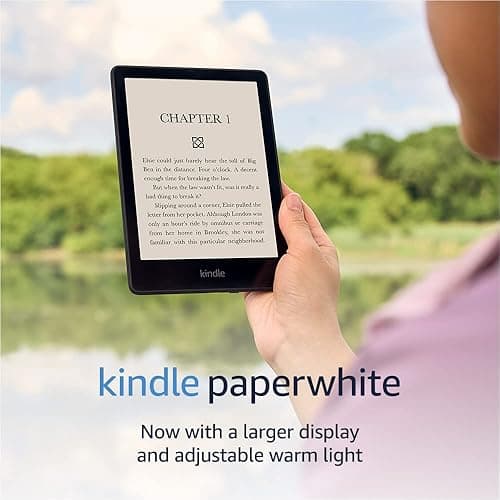
Kindle Paperwhite (16 GB)
The Kindle most people should buy. A bigger 7-inch screen, adjustable warm light for night reading, fast page turns and IPX8 waterproofing for the bath, the pool or the beach.
What we like
- Larger 7-inch screen
- Waterproof
- Warm light
- Longest battery life
Keep in mind
- Costs more than the basic Kindle
- Screen
- 7 in, black and white
- Waterproof
- Yes (IPX8)
- Warm light
- Yes
- Battery life
- Up to 12 weeks
#3 · Wireless charging and auto light · Mid-range
Kindle Paperwhite Signature Edition (32 GB)
Everything in the Paperwhite plus an auto-adjusting light sensor, wireless charging and twice the storage. Worth it if you want the most convenient Kindle without color.
What we like
- Auto-adjusting front light
- Wireless charging
- 32 GB storage
Keep in mind
- Most readers will not need the extra storage
- Screen
- 7 in, black and white
- Waterproof
- Yes (IPX8)
- Warm light
- Yes
- Battery life
- Up to 12 weeks
#4 · Comics, cookbooks and highlights in color · Premium
Kindle Colorsoft
Amazon's color Kindle shows book covers, comics, graphic novels and children's books in soft color, and lets you highlight in different colors, while keeping the paper-like feel.
What we like
- Color screen
- Waterproof
- Warm light
Keep in mind
- Most expensive
- Color is soft, not like a tablet
- Screen
- 7 in, color
- Waterproof
- Yes (IPX8)
- Warm light
- Yes
- Battery life
- Up to 8 weeks
Do you need Kindle Unlimited?
Kindle Unlimited is Amazon's book subscription. Kindles are often sold in bundles with a few free months of it. Prime members also get Prime Reading, a smaller free library, at no extra cost.
Ad-supported or without ads?
Kindles come with "lockscreen ads" (offers shown on the sleep screen) or without them for a bit more money. The ads never appear inside books. You can also remove them later for a fee.
Our verdict
Buy the Kindle Paperwhite unless you have a reason not to. Pick the basic Kindle to save money, the Signature Edition for wireless charging, and the Colorsoft if you read comics, cookbooks or kids' books.
Frequently asked questions
Is the Kindle Paperwhite worth it over the basic Kindle?
For most people, yes: the bigger screen, waterproofing, warm light and longer battery are worth the difference, especially when it is on sale.
Can I read library books on a Kindle?
Yes. In the US, many public libraries lend Kindle books through the Libby app; you send them to your Kindle from the Libby app or website.
When are Kindles cheapest?
Prime Day in July, the October Prime event and Black Friday week usually bring the lowest Kindle prices of the year.
Specs and features come from the manufacturers and can change between versions. Prices change often on Amazon, so check the current price and the exact model before you buy.